


Vegan Bowls: Plant Based Meals
4.431.00 Reviews
App Specs
- Version
- 1.2.4
- Updated On
- License
- Free
- Downloads
- 10,000+
- Developer
- TouchZen Media LLC
- Categories
- Food & Drink
- Platform
- Android
Screenshots
 Analysis by AppCompare
When I first opened Vegan Bowls: Plant Based Meals, the appeal was easy to understand: it gives me a focused place to look for plant-based bowl ideas rather than making me sift through general recipe collections. That focus is useful in the first week, when a new cooking habit needs a little inspiration. I could browse for a meal, check what it calls for, and use the instructions as a guide instead of starting with a blank counter and no plan.
That early novelty is not enough to earn an app a lasting place on my phone, though. The better test is whether it helps me make decisions on an ordinary Wednesday, when I have limited time, a few ingredients already in the fridge, and no appetite for an elaborate project. For me, a recipe app is most useful when it makes the next meal easier to choose and the shopping trip easier to manage. Vegan Bowls: Plant Based Meals has practical tools for that routine, but it works best when I treat it as a source of ideas rather than a complete meal-planning system.
It is a free Food & Drink app from TouchZen Media LLC, with optional in-app purchases ranging from $3.99 to $19.99 per item. The app has a 4.4 average from 355 ratings, 31 written reviews, and more than 10K installs. It is rated for Everyone, and version 1.2.4 requires Android 6.0 or later. Those details make it easy to place: it is an approachable recipe app, not a specialist nutrition service or a substitute for personal dietary advice.
The first-week appeal is about getting unstuck
During the first few uses, the bowl format gives browsing a helpful boundary. Instead of trying to decide among every kind of vegan meal, I can focus on a combination of ingredients that can come together in one dish. That is especially handy for someone new to meatless cooking, because a bowl can bring together familiar components while leaving room to try a new sauce, grain, or vegetable. I would start by choosing recipes that share ingredients, not by picking the most visually striking options at random.
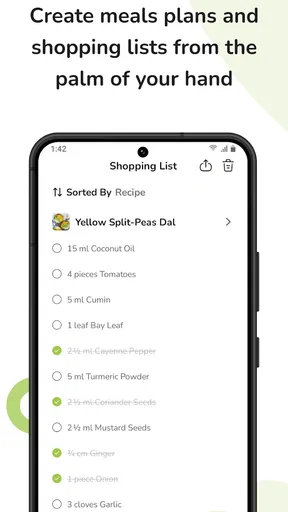
A realistic use is planning a quick lunch after work. I can look at a recipe before shopping, note the ingredients I am missing, and add what I need to the shopping list. When I get home, the step-by-step instructions offer a clearer route than trying to remember a recipe I saw earlier. The photos and estimated cooking times can help set expectations, though I would still allow a little flexibility: a time estimate cannot account for how quickly I chop, what equipment I have, or whether an ingredient needs extra preparation.
This is where the app’s specific tools support one another. A recipe can spark the idea, the ingredient list can shape the shop, and the cooking steps can carry me through the meal. That sequence is more useful than collecting recipes without ever making them. My practical tip is to choose a dish before heading to the store and check whether it uses ingredients I already have. That small check can turn browsing into a plan and reduce the chance of buying a one-off ingredient that sits unused afterward.
What’s Cooking in Vegan Bowls?
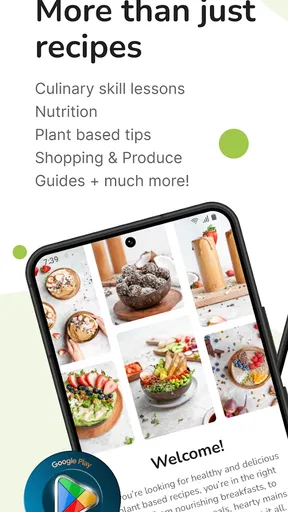
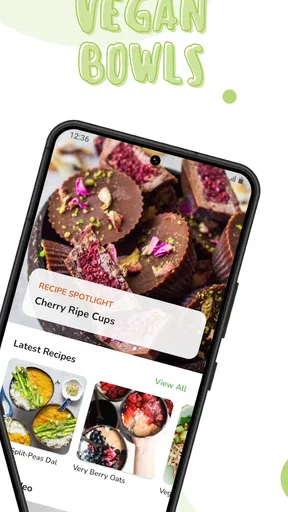
First off, let’s talk about what Vegan Bowls: Plant Based Meals brings to the table. This app is like your personal culinary assistant, designed to help you whip up delicious, plant-based meals. Whether you’re a seasoned vegan or just dabbling in meatless Mondays, this app has something for everyone.
Worth Reading Before You Choose

Flipboard Shows What News Apps Must Do Beyond the Feed

Switching to Android Auto Means Rethinking Your Driving Routine

Google Calendar Makes a Crowded Week Easier to Manage

Ludo King Makes the Most of the Minutes Between Plans

Baby Panda World Brings Quick Play to Modern Phones, but Its Game Library Feels Busy

ESPN’s Live Game View Makes Following Close Games Easier
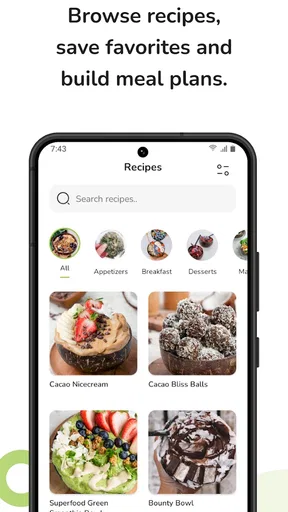
The app offers a vibrant collection of recipes that are not only healthy but also Instagram-worthy. Seriously, who knew that eating your greens could look this good? The interface is super user-friendly, making it easy to navigate through different categories like breakfast, lunch, dinner, and even snacks.
Features That Stand Out
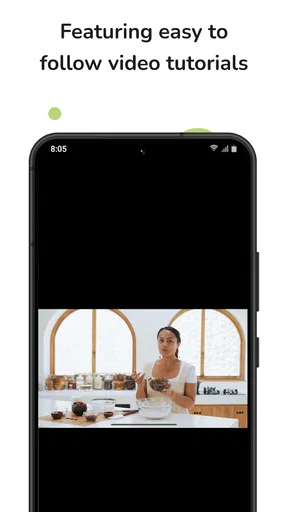
Now, let’s get into the nitty-gritty of what makes this app a must-have. One of the features I absolutely love is the step-by-step cooking instructions. The app breaks down each recipe into easy-to-follow steps, complete with photos and estimated cooking times. Perfect for those of us who need a little extra guidance in the kitchen!
The app also includes a handy shopping list feature. You can add all the ingredients you need directly from the recipes to your shopping list. This has been a lifesaver for me, especially when I’m trying to stick to my budget and avoid impulse buys at the grocery store.
Another cool feature is the nutritional information provided with each recipe. It’s great to know exactly what you’re putting into your body, and this app makes it easy to track your intake of calories, protein, carbohydrates, and more. It’s like having a nutritionist in your pocket!
Getting Creative in the Kitchen
I have to say, one of the best things about this app is how it inspires creativity. The variety of recipes encourages you to try new ingredients and cooking techniques. I found myself experimenting with flavors I’d never thought to combine before, and the results were surprisingly delicious.
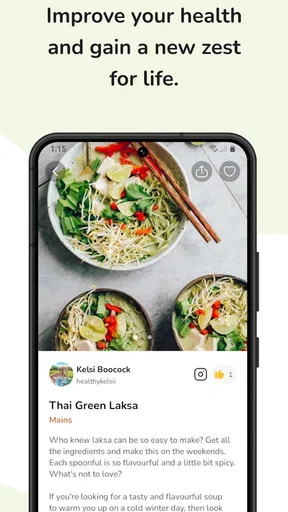
The global cuisine section is particularly exciting. From Thai curry bowls to Mexican-inspired quinoa salads, there’s a world of flavors to explore. It’s a fun way to spice up your meal rotation and keep things interesting. Plus, your friends will be super impressed when you invite them over for dinner!
Making it useful beyond the novelty
After the first burst of inspiration, recurring value depends on whether I can fit the recipes into the way I actually shop and cook. The shopping list is the most practical bridge between an appealing recipe and a repeatable habit. I would use it as a prompt, then review the list before leaving home: check pantry staples, remove anything already on hand, and group the remaining items by where I expect to find them. That extra review matters because recipe lists are starting points, not a guarantee that every ingredient suits my budget or local store.
There is also a useful trade-off between following a recipe closely and using it as a template. If I make the same bowl again, I can keep the basic structure and change a vegetable or topping based on what needs using. I would avoid assuming that every substitution preserves the recipe’s original nutrition details, however. The nutritional information is most useful as a reference for the recipe as written; swapping ingredients or changing portions can alter the result. Anyone tracking food closely should treat those figures as guidance, not as a personalized assessment.
Compared with a general recipe search, this app’s bowl-centered focus can make browsing feel less scattered. A broad recipe site may be a better choice when I want a particular dish outside the bowl format, need extensive filtering, or want to compare many versions of one recipe. A notes app or a simple weekly menu may be better for someone who already knows what they cook and only needs to record it. Vegan Bowls is most compelling when I want ideas and a guided route from recipe to ingredients to cooking, rather than a flexible database for every possible meal.
Where the routine can become harder
The same focus that makes the collection approachable can also narrow its usefulness. If I want a baked dish, a sandwich, or a very specific regional recipe, a bowl-focused collection may not be the place I would turn first. Likewise, someone who prefers improvising from whatever is available may find detailed instructions more restrictive than helpful. I see the app as a companion for choosing and assembling meals, not as a rulebook that needs to be followed exactly.
Another maintenance burden is the work that remains outside the app. I still need to decide which recipes suit my schedule, check what is already in the kitchen, and make sensible substitutions. The shopping list can reduce forgetfulness, but it cannot decide whether I want to cook on a busy evening or whether a planned ingredient is worth buying for one meal. To keep the process light, I would pick a small number of recipes for the week and reuse overlapping ingredients. That makes the app more useful without turning meal planning into a second job.
Recipe fatigue can also set in if I browse without a purpose. A steady stream of appealing ideas is enjoyable at first, but repeatedly saving or considering dishes without cooking them can make the collection feel like another source of decisions. I find it more sustainable to use a simple rotation: one familiar bowl for a low-effort day, one recipe with a new flavor, and one flexible meal built around ingredients already at home. That approach gives variety without expecting every meal to be a cooking experiment.
Who will get the most from it?
I would recommend Vegan Bowls: Plant Based Meals to a curious beginner who wants plant-based meals to feel manageable, or to a regular vegan cook who has fallen into a repetitive lunch routine and wants fresh combinations. The step-by-step guidance can help someone who is still gaining confidence, while the cuisine variety gives a more experienced home cook a nudge toward flavors they might not have paired before. It is also a sensible fit for anyone who likes seeing recipe nutrition details alongside cooking instructions.
I would suggest looking elsewhere if the priority is a fully customized meal plan, precise dietary coaching, or a recipe library that spans every kind of cuisine and format. The app can help me understand a recipe and organize its ingredients, but that is different from tailoring meals to a medical need or automatically managing a household’s schedule. People with allergies or strict dietary requirements should read each ingredient carefully and make their own checks rather than relying on a broad label or a nutrition panel alone.
For a shared household, the most useful approach may be to use a recipe as the starting point and agree on any changes before shopping. One person can choose the bowl, another can check pantry items, and whoever cooks can adapt the toppings to individual tastes. That is a practical way to make a focused recipe collection work for more than one person, while recognizing that a single recipe will not automatically suit everyone’s preferences.
Ending on a Delicious Note
So, is Vegan Bowls: Plant Based Meals worth downloading? In my opinion, absolutely. It’s a fantastic resource for anyone looking to incorporate more plant-based meals into their diet. The app is packed with features that make cooking not only easier but also more enjoyable.
Whether you’re a vegan veteran or a curious newbie, this app has something to offer. It’s not just about eating healthy; it’s about discovering new flavors, improving your cooking skills, and feeling great about what you’re putting on your plate. Give it a try and let me know what you think!
Happy cooking!
Does it earn a lasting place?
For me, the answer depends less on how many recipes I browse at the start and more on whether I return when I need an ordinary meal idea. The guided steps, ingredient-to-list workflow, and nutrition details give it reasons to stay useful after the novelty fades. Its lasting value is strongest when I make a recipe, learn which parts I enjoy, and adapt the idea to ingredients I already buy. If I only open it to scroll, the appeal is likely to wear thin.
I would keep it in my routine as a focused source of plant-based bowl inspiration, while using other tools when I need broader recipe discovery or more personalized planning. That is a fair role for this app: it can lower the effort of getting a meatless meal onto the table, but it does not remove the need to shop thoughtfully or make choices that fit my own needs. If that balance sounds useful, it is worth trying; if bowls are not the format I want to cook regularly, a broader recipe app will probably serve me better.
Pros
- User-friendly interface for easy navigation.
- Extensive recipe collection with diverse options.
- Nutritional info provided for each recipe.
- Shopping list feature for meal planning.
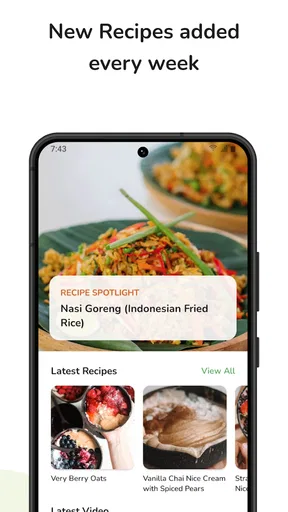
- Regular updates with new recipes.
Cons
- Limited offline access to recipes.
- Some features require a subscription.
- Occasional app crashes reported.
- No calorie tracking integration.
- Limited customization for dietary needs.
FAQs for Vegan Bowls: Plant Based Meals
What is the main purpose of the Vegan Bowls app?
Vegan Bowls: Plant Based Meals is designed to offer users a comprehensive guide to preparing delicious and nutritious plant-based meals. It provides a wide variety of recipes, catering to both novice and experienced cooks looking to explore vegan cuisine. The app aims to simplify meal planning with easy-to-follow instructions and vibrant visuals.
Are the recipes suitable for beginners?
Absolutely! The Vegan Bowls app is user-friendly and includes recipes that cater to all skill levels. Each recipe comes with detailed instructions and step-by-step photos, making it easy for beginners to follow along. Additionally, the app provides tips and tricks to help users enhance their cooking skills as they progress.
Does the app provide nutritional information for each recipe?
Yes, the Vegan Bowls app includes detailed nutritional information for every recipe. This feature allows users to track their intake of calories, macronutrients, vitamins, and minerals. It’s particularly beneficial for those who are mindful of their dietary needs and want to ensure they are maintaining a balanced vegan diet.
Is the app regularly updated with new recipes?
The Vegan Bowls app is frequently updated to include new and exciting recipes. This ensures that users always have access to the latest trends and seasonal ingredients. Regular updates help keep the app fresh and engaging, encouraging users to continuously explore new meal ideas and expand their culinary repertoire.
Can I customize the recipes to suit my dietary preferences?
Yes, the Vegan Bowls app encourages customization and allows users to adapt recipes according to their dietary needs and preferences. Whether you’re looking to reduce sugar, avoid gluten, or incorporate more protein, the app provides suggestions and alternatives to help you modify recipes while maintaining their delicious flavors.


